| Version 3 (modified by , 11 years ago) ( diff ) |
|---|
Version Control with git
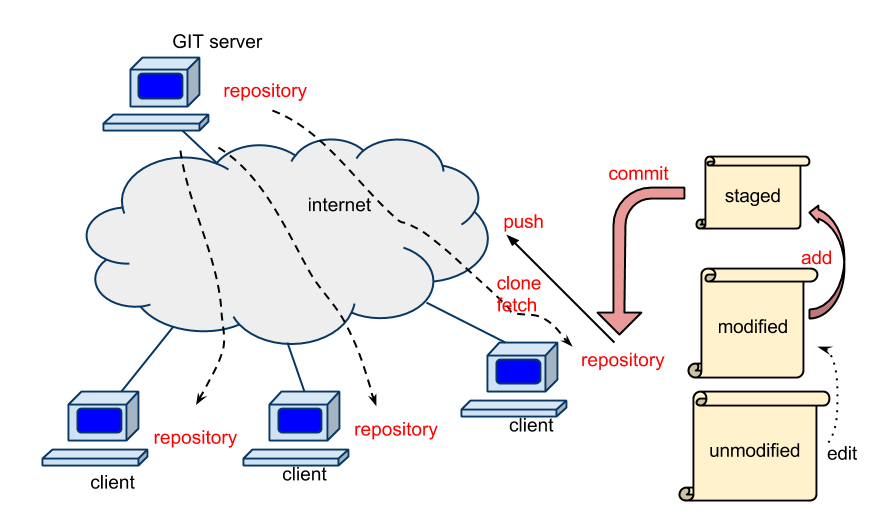
Git is a free and open source distributed version control system designed to handle everything from small to very large projects with speed and efficiency.
To use git on Cypress, you have to load module. It is better to set this in .modulerc (see below).
[fuji@cypress2 ~]$ module load git
Create a project repository
On your project directory, for example, (replace dpg with your project folder name)
[fuji@cypress2 fuji]$ cd projectX
[fuji@cypress2 projectX]$ git init
Initialized empty Git repository in /lustre/project/dpg/fuji/projectX/.git/
Add a file and commit
[fuji@cypress2 projectX]$ echo "This is README.txt for my git-repo" > README.txt
[fuji@cypress2 projectX]$ git add README.txt
[fuji@cypress2 projectX]$ git commit -m"first commit"
[master (root-commit) 4fe9eae] first commit
 Committer: Hideki Fujioka <[email protected]>
Your name and email address were configured automatically based
on your username and hostname. Please check that they are accurate.
You can suppress this message by setting them explicitly. Run the
following command and follow the instructions in your editor to edit
your configuration file:

    git config --global --edit

After doing this, you may fix the identity used for this commit with:

    git commit --amend --reset-author

 1 file changed, 1 insertion(+)
 create mode 100644 README.txt
You can work with this repository on Cypress.
Create a Bare Repository
If you want to make a git server repository, you have to make a Bare Repository. For example,
[fuji@cypress2 dpg]$ mkdir repos
[fuji@cypress2 dpg]$ cd repos
[fuji@cypress2 repos]$ git clone --bare ../fuji/projectX ./projectX.git
Add group write permissions to a repository so that people in your group can pull/push.
[fuji@cypress2 repos]$ cd projectX.git
[fuji@cypress2 projectX.git]$ git init --bare --shared
Reinitialized existing shared Git repository in /lustre/project/dpg/repos/projectX.git/
Make a Clone Repository
Make a clone repository on Cypress,
[fuji@cypress2 ~]$ git clone file:///lustre/project/dpg/repos/git/projectX.git
Cloning into 'projectX'...
remote: Counting objects: 3, done.
remote: Total 3 (delta 0), reused 0 (delta 0)
Receiving objects: 100% (3/3), done.
Checking connectivity... done.
[fuji@cypress2 ~]$ ls
projectX
Make a clone repository over network, (you may have to type password)
Hideki02:~ fuji$ git clone [email protected]:/lustre/project/dpg/repos/git/projectX.git
Cloning into 'projectX'...
remote: Counting objects: 3, done.
remote: Total 3 (delta 0), reused 0 (delta 0)
Receiving objects: 100% (3/3), done.
Checking connectivity... done.
Hideki02:~ fuji$ ls
projectX
Since git is not a default module on Cypress, you have to set ~/.modulerc like:
#%Module3.2.10
module load git
Free Git Repository
Basic Commands
Add new files
Hideki02:projectX fuji$ git add test.txt
This command updates the index using the current content found in the working tree, to prepare the content staged for the next commit.
Commit
Hideki02:projectX fuji$ git commit -m"message"
Stores the current contents of the index in a new commit along with a log message from the user describing the changes. At this point, only your local clone has your modification.
push
When you have your project at a point that you want to share with your group people, you have to push it to a master repository.
Hideki02:projectX fuji$ git push
You may have to type password for Cypress.
pull
To pull current project in the master repository,
Hideki02:projectX fuji$ git pull
Documents
Attachments (1)
- GIT_model.png (43.9 KB ) - added by 11 years ago.
Download all attachments as: .zip